Skip to content

Client communication software for consultants

Every message
should move
the work forward.

Client communication software for consultants who want the context, the conversation and the next action together.

Use Practice to work with client email alongside your engagements. Prepare a clear message, review what it refers to and keep the resulting conversation useful.

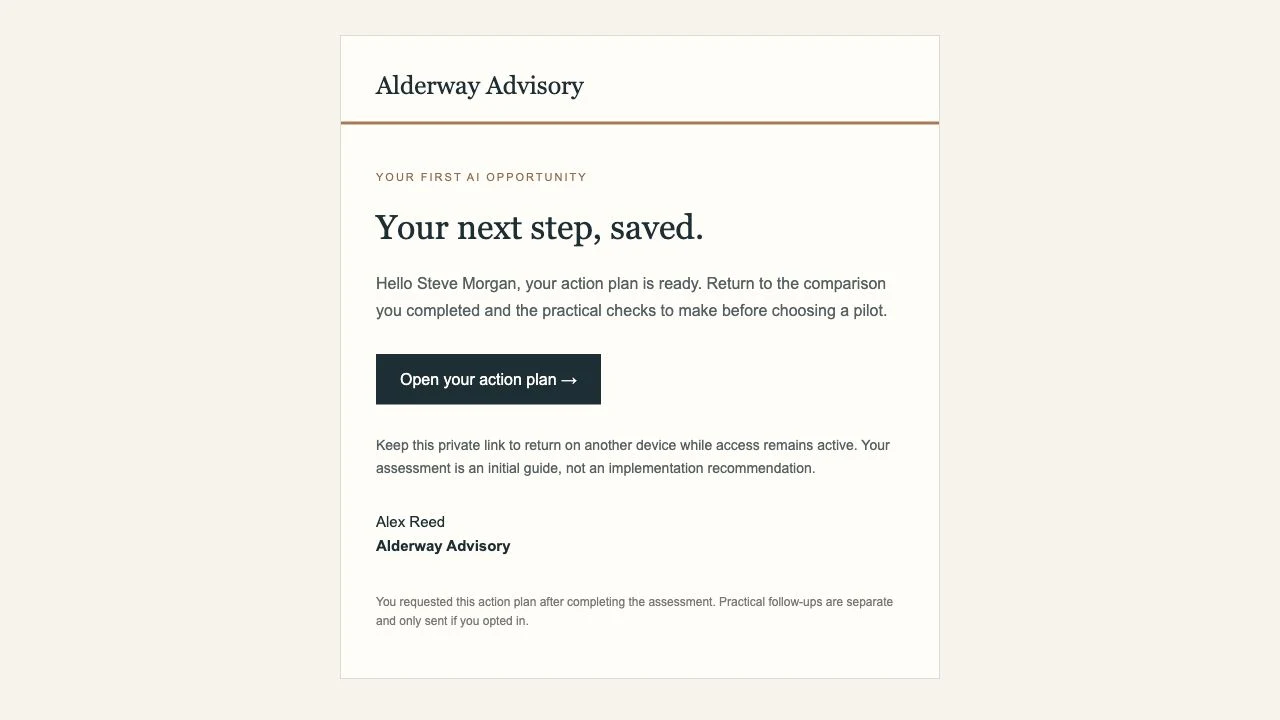
Alderway Advisory’s example delivery email: Your next step, saved
Alderway Advisory × Fenwick Trade Supply · an example client journey.

Start with context.

What has this client seen, requested or agreed?

Send something useful.

A decision, an answer or work they can inspect.

Make the next step clear.

Who needs to do what, and what is still unresolved?

One conversation, four useful moments

From an initial question
to a considered next step.

Fenwick is exploring an AI opportunity in its order process. Alderway delivers the initial action plan, adds practical context, receives a reply and prepares the next conversation. Explore what each message contributes.

Alderway Advisory

Your first AI opportunity action plan

Hello Steve, your action plan is ready. Return to the comparison you completed and the practical checks to make before choosing a pilot.

Keep the private return link so you can revisit the plan while access remains active. Your assessment is an initial guide, not an implementation recommendation.

Inspect the sample action plan
Give the message a reason to exist

Something worth
returning to.

The first email gives Steve a route back to the action plan he requested. Its job is modest and specific: make the useful work easy to find again.

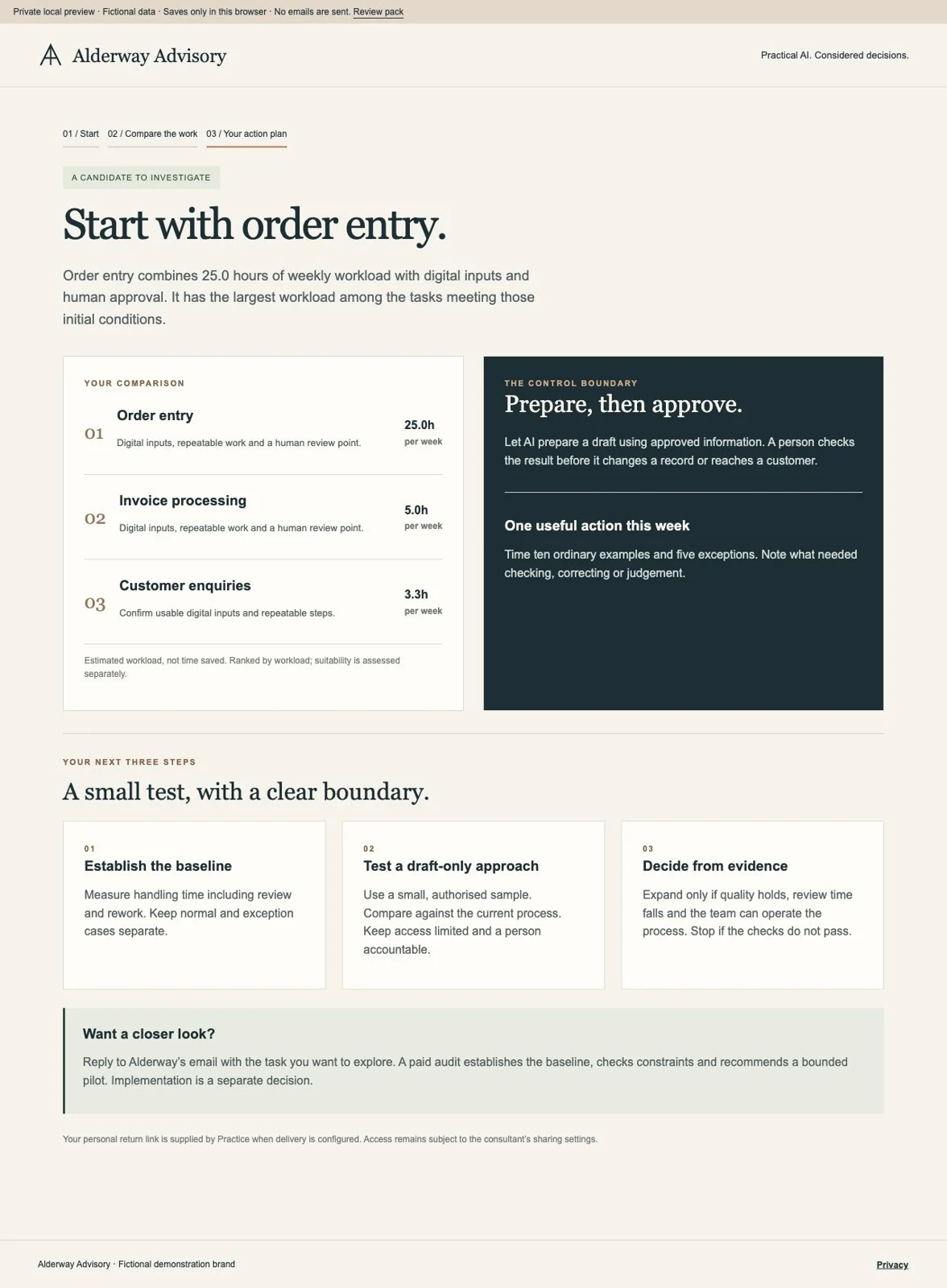
The next stage is a paid audit. It develops the order-entry opportunity into a report covering the evidence, working assumptions and proposed pilot.

The follow-up gives the client concrete decisions: confirm ERP access, test the handling-time assumptions and agree how to measure the pilot.

Example audit report · seven pages

Alderway’s saved action plan for the fictional Fenwick opportunity
The initial action plan is the object of the delivery message. The detailed audit follows a separate agreement.

Inside Practice

Review the message
beside the work.

Open a prepared native email example to inspect the interface. This separate Cairn demonstration shows email drafting in the app; the Alderway correspondence above tells the portfolio story.

Client email in PracticeProduct demo

A deliberate sending workflow

Context first.
Review next.
Then send.

Practice brings authorised mailbox conversations and client context into the workspace. Access still depends on the connected mailbox: membership of a workspace does not itself grant access to somebody else’s email.

Keep the message focused on the recipient’s decision. An internal analysis may need a short explanation, a clear link and an explicit request before it becomes useful client communication.

01

Find the relevant conversation

Check the client, engagement and existing thread. Confirm what has already been shared so that your message continues the conversation instead of restarting it.

02

Prepare the message

Explain why you are writing, what has changed and what you need next. Name unresolved questions rather than turning assumptions into promises.

03

Inspect recipients and access

Review the To and CC fields, particularly when replying to a group. Check that a linked document is the intended version and that the client can access it; an internal workspace link is not automatically public.

04

Review the sending state

Use an eligible connected account and resolve any connection problem before sending. Check the resulting communication status. A draft, queued item and sent message are different records of progress.

Keep the status honest

A prepared message
is not a completed conversation.

Draft

The wording is being prepared. Review the message and recipient before treating it as ready.

Scheduled or queued

A future action is waiting. It is not confirmation that the client has received anything.

Sent

The sending step has completed. This does not establish that the client read, accepted or acted on the message.

Blocked or failed

Investigate the reason, account and recipient before retrying. Do not assume the intended follow-up happened.

Before the next client email

Make the review
repeatable.

Check purpose, recipients, evidence, access and the requested action. A short review is especially useful when the message carries a proposal, audit, change request or invoice.

A reusable pre-send checklist for a consultant’s client correspondence.
Editable text · no email required

Download the message checklist

Useful answers

Before you
begin.

Can I work with client email in Practice?

Practice supports authorised connected mailbox conversations and outbound communication workflows. Availability depends on your connected account and its permissions. Workspace membership alone does not grant access to another person’s mailbox.

Can I assume a follow-up stops when the client replies?

No such behaviour is claimed here. Automatic suppression on reply was not verified for the Alderway journey. Review the conversation and any scheduled communication before relying on it.

How should I share the work behind a client message?

Choose the intended version and check its access before sending. A link to an internal artefact is not automatically accessible to a client. Make the purpose and next action clear in the message itself.

Keep the engagement connected

The work and
the conversation around it.

Give each client message the context it deserves.