A six-week diagnostic and an ongoing advisory relationship need different explanations. These two complete portfolio examples make the scope, fees, review process and boundaries visible.
Orison Operations × Calder Vale Instruments
A defined assignment.
£24,000 for a sales-to-production handoff review at one manufacturing site, from 1 February to 12 March 2027.
The fee is allocated across £9,600, £9,600 and £4,800 milestones. Later invoices depend on the written acceptance specified in the agreement, not simply a date arriving.
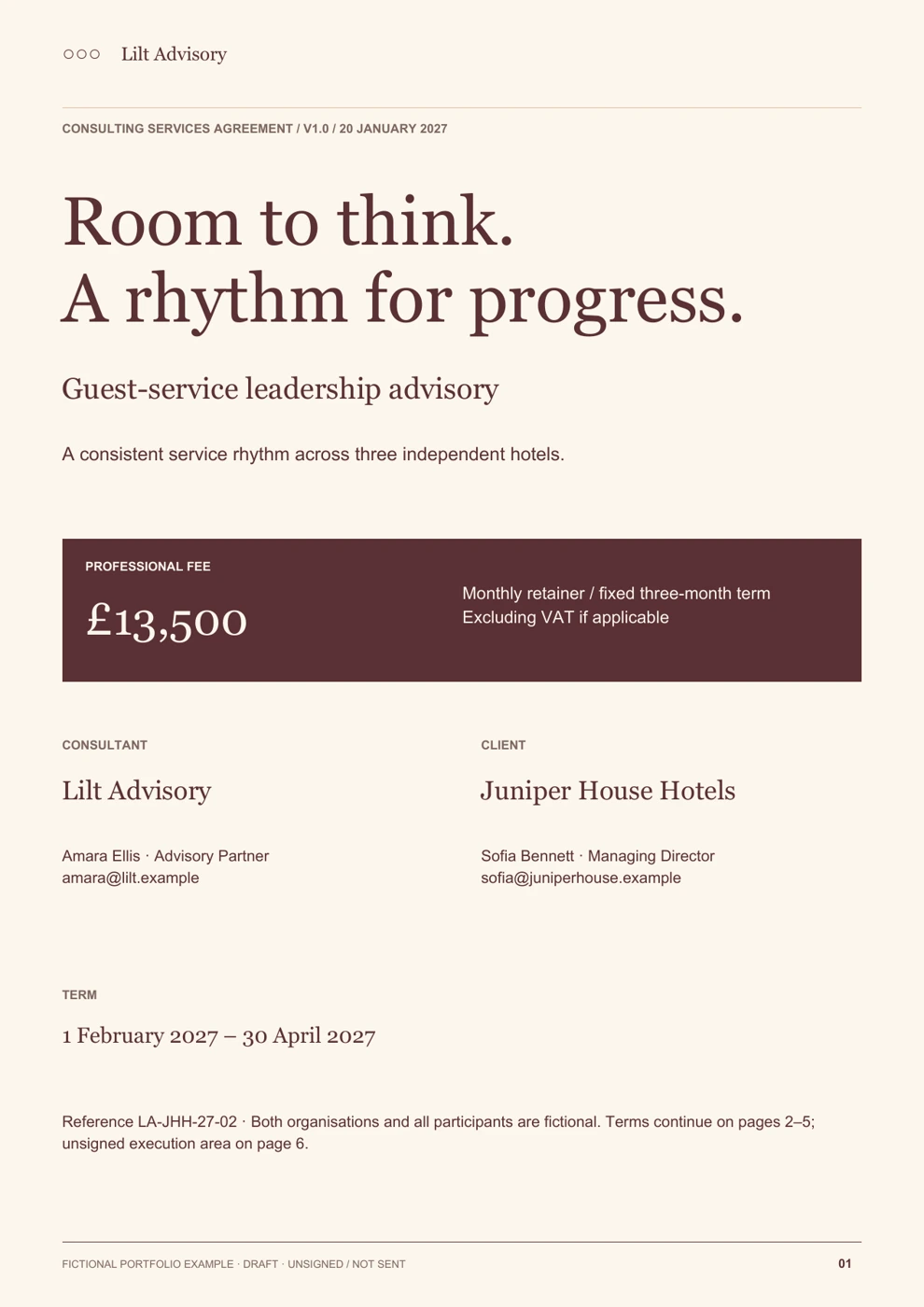
£4,500 per month for February–April 2027, reserving three seven-hour advisory days each month across three hotels.
The remit includes review packs, leadership discussion and coaching within that capacity. It excludes daily operational cover and does not renew automatically.
Choose an engagement, explore all six pages or switch to readable text. Each example includes scope, responsibilities, fees, review, confidentiality, rights, changes and an unsigned execution area.
Inside Practice
From working terms to a reviewable draft.
Explore contract drafting in Practice, then use the complete Orison and Lilt examples to compare scope, fees and review terms.
Contract drafting in PracticeProduct demo
The written workflow
Prepare. Review. Then progress.
Practice supports contract drafts, reusable contract designs and electronic or external signing workflows. Keep the commercial review distinct from the act of sending an invitation.
01
Bring the engagement into the draft
Identify the client, work, deliverables, fee and intended parties. Review the actual terms when adapting an example; replacing the names does not update every amount, date or scope assumption.
02
Review the complete document
Check every page, including responsibilities, exclusions and changes. Confirm the named signers and their email addresses. Saving a draft or adding a signer does not send an invitation.
03
Choose the signing route
Electronic signing uses email verification and typed or drawn signatures with explicit consent. External signing freezes a downloadable PDF for execution outside Practice and later upload.
04
Send the reviewed revision
Send only after the document and recipients are ready. Issued documents are frozen; use the management workflow for withdrawal or revision rather than silently changing terms already sent.
When the client asks for more
A useful agreement helps the next conversation.
The value is in the specific decision it helps you make. The supporting correspondence explores two ordinary requests without treating either request as approval of extra work.
Orison · a second site
Same problem. Wider scope.
The agreed diagnostic covers one site. A request to include South works needs its own discussion of scope, fee and timing. The original agreement provides the baseline for that conversation.
The final £4,800 remains linked to the stated acceptance and handover conditions. An additional request does not replace those conditions.
Lilt · the night team
A new priority. Finite capacity.
The example has half a day remaining for a focused follow-up. A full workshop plus preparation would need a separately approved additional £750.
The correspondence distinguishes work that fits the reserved time from extra work requiring approval. No additional fee has been approved in the example.
Carry the terms into delivery
Agreement. Work. Billing.
A signature, acceptance of a deliverable and payment are different events. Keep the agreed deliverables and review responsibilities available as the engagement progresses.
Create and review the billing schedule separately. A calendar date does not confirm that a milestone was accepted, and an agreement does not establish an automatic debit.
Useful answers
Before you begin.
Can I create consulting agreements in Practice?
Yes. Practice supports private contract drafts with named parties and a platform-owned signing page. You can review the document and use the electronic or external signing workflow when it is ready.
Does creating a contract send it to the client?
No. Creating or editing a contract saves a draft. Adding signers does not send invitations. Sending is a separate action for the reviewed revision.
Can I reuse a contract design?
Practice supports reusable contract templates. A new agreement needs fresh client details, signers and field values. Review scenario-specific terms, fees and dates before using an adapted design.
Are these agreements ready-to-use legal templates?
Use these example agreements to plan your scope, fees and responsibilities. Tailor the terms to the engagement and have the final agreement reviewed before signing.
Is the signature page shown in the PDF the app’s signing screen?
No. The portfolio PDFs end with static unsigned execution areas. Practice owns the actual signing interface, verification and signature record in its native workflow.
A clear beginning
Make the commitment easy to understand.
Bring agreements into the workspace where you manage the client and deliver the work.